

Kubernetes Capacity Calculator
This tool estimates the required number of nodes and capacity of a K8s cluster based on the planned container workload.
| Flexible Workloads | |
|---|---|
| Total CPU (cores) | 0.80 |
| Total Memory (GiB) | 1.00 |
| Node-bound Workloads | |
| CPU per Node (cores) | 0.05 |
| Memory per Node (GiB) | 0.06 |
| System Overhead & Reservations | |
| CPU per Node (cores) | 0.20 |
| Memory per Node (GiB) | 0.29 |
| Node Sizing Results | |
| Number of Nodes | 1 |
| vCPU per Node | 4 |
| Memory per Node (GiB) | 16 |
| Cluster Capacity | |
| Total vCPU | 4 |
| Total Memory (GiB) | 16 |
| Cluster Utilization | |
| CPU (cores) | 1.05 |
| Memory (GiB) | 1.26 |
| CPU (%) | 26.25 |
| Memory (%) | 7.86 |
| Average Node Utilization | |
| CPU per Node (cores) | 1.05 |
| Memory per Node (GiB) | 1.26 |
| CPU per Node (%) | 26.25 |
| Memory per Node (%) | 7.86 |
K8s Sizing Calculator - Overview
This calculator helps estimate the required Kubernetes cluster size based on the expected workload, operational overhead, and resource allocation strategies. It supports two sizing modes:
- determining the required number of nodes based on the chosen node specifications
- determining the required node specifications for a given node count
The calculator accepts CPU and memory requirements for application workloads, per-node DaemonSet workloads, and system/OS overhead. It produces consolidated totals, estimates per-node utilization, and provides guidance for selecting an appropriate node configuration.
This tool is intended for high-level capacity planning, early design estimation, and educational use. It does not replace detailed workload planning and performance tuning.
How to Use the Calculator
- Enter the resource requirements for application (flexible) workload (CPU, memory, number of pods).
- Enter the node-bound workload details (DaemonSets and per-node platform agents).
- Enter the OS and Kubernetes system overhead values.
- Choose the sizing mode: by Node Specs or by Node Count.
- Optionally adjust the eviction threshold, target node utilization, and any default values.
- Click Calculate and review the resulting sizing recommendations, including estimated cluster and node capacity utilizations.
Description of Input Fields
- Flexible Workload (Movable Pods) - These are pods that can be placed on any node and scale horizontally. Examples
include Deployments, ReplicaSets, StatefulSets, and typical services.
- Name - workload description (optional).
- CPU per Pod (millicore) - CPU requirements for each pod instance.
- Memory per Pod (MiB) - memory requirements for each pod instance.
- Number of Pods - total number of running pods for this workload.
- Per-Node Workload (DaemonSet / Node-Bound Agents) - These are pods deployed one per node,
regardless of how many nodes exist. Examples include monitoring agents, log shippers, and platform tools.
- Name - workload description (optional).
- CPU per Pod (millicore) - CPU requirements for the pod on each node.
- Memory per Pod (MiB) - memory requirements for the pod on each node.
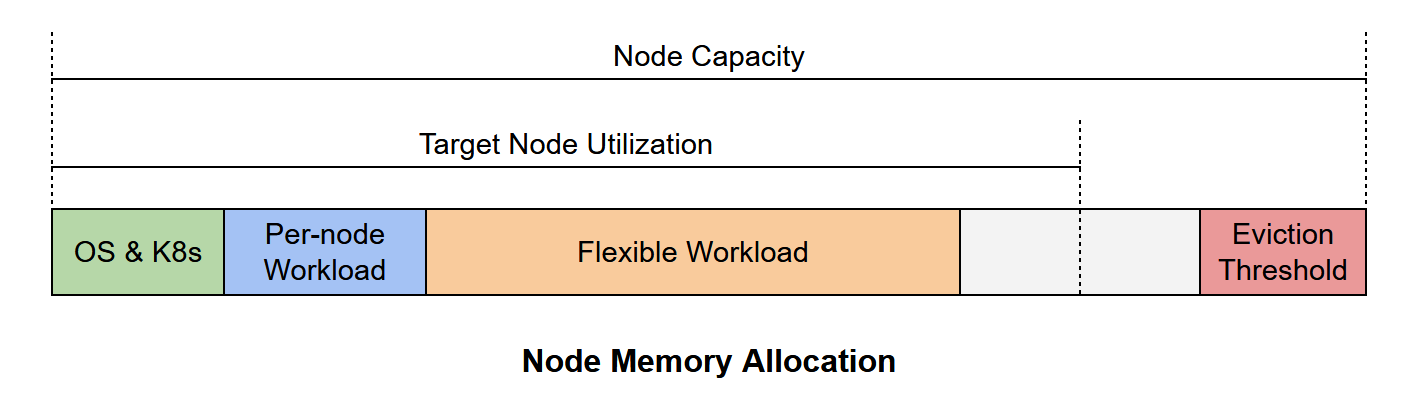
- System Overhead / Reservations (per Node) - Node's CPU and memory allocated/reserved for
Linux OS processes, kubelet, containerd, and other Kubernetes services and system daemons.
- CPU for OS & K8s Services (millicores)
- Memory for OS & K8s Services (MiB)
- Eviction Threshold - Kubernetes requires additional unused memory as a buffer. This value represents the available memory threshold before the kubelet begins evicting pods.
- Target Utilization - Defines the desired maximum CPU and memory usage, expressed as a percentage. It accounts for: headroom, performance variability, pod autoscaling, maintenance events, and pod rescheduling.
- Sizing Modes:
- Determine Number of Nodes (from Node Specs) - Use this mode when you already know the instance type or node
specifications. Provide:
- vCPU per node
- Memory per node (GiB)
- Determine recommended node specs from node count - Use this mode when you know how many nodes you want to run. Provide the desired number of nodes. The calculator determines the required CPU and memory per node, which helps selecting the appropriate instance type or bare-metal server configuration.
- Determine Number of Nodes (from Node Specs) - Use this mode when you already know the instance type or node
specifications. Provide:
The following diagram illustrates node memory allocation in relation to workload characteristics and cluster memory configuration.
K8s Sizing Recommendations and Best Practices
- Use realistic resource requirements - decide whether to use requests or limits as the base for sizing calculations.
- Avoid targeting 100% utilization - use 60-80% to maintain stability and headroom.
- Include all per-node workloads in sizing - make sure to account for all DaemonSets, agents, and tools.
- Account for OS and K8s overhead - ensure sufficient resource allocation for system and kubelet processes.
- Consider pod density limits per node.
- Consider autoscaling where possible - improve cluster utilization and reduce over-provisioning.
- Distribute workloads across availability zones - ensure high availability and reduce blast radius for failures.
- Evaluate real usage - use monitoring tools and load testing to validate and refine cluster sizing.